


Key Takeaways
- Download the VT Markets app from the App Store, Google Play Store, or official website.
- Client Portal and trading accounts use separate passwords, so make sure you use the correct one.
- Always use your latest email and password, especially after any updates, to avoid login issues.
- If you are not receiving emails from VT Markets, check your spam folder, blocked sender list, and email settings.
- Certain settings, including account type and currency, cannot be changed after creation. You will need to open a new account instead.
Opening a live trading account is only the first step. After registration, many clients need help with practical account tasks such as downloading the VT Markets app, logging in for the first time, changing passwords, updating personal information, enabling security settings, or understanding which account settings cannot be changed.
This guide explains the most common VT Markets account settings and post-registration actions in one place, so you can manage your account more smoothly after signing up.
How to Download the VT Markets App
The VT Markets app is available on both the Apple App Store and Google Play Store by searching for VT Markets. You can also access the download through the QR code on the official VT Markets website.
Steps to Download and Install
For Android Open the Google Play Store and search for “VT Markets” or click here.
For iPhone or iPad
Open the Apple App Store and search for “VT Markets” or click here.
Once the app is installed, log in using your account details to access your trading account and manage your profile on the go.
Getting Started After Downloading
Once the VT Markets app has been installed, you can sign in using your registered account details. Although the process is straightforward, login problems can still happen, especially when older credentials are used after an account update.
For instance, if you have recently changed your registered email address or reset your password, make sure you are entering your most up-to-date login information. Using previous details may prevent access even when your account remains active.
Before signing in, check that:
- You are using the correct registered email or login details
- Your password is the latest one if you recently changed it
- You are signing in through the official VT Markets app rather than an outdated shortcut or saved old page
Managing Your VT Markets Passwords
Your Client Portal and trading accounts have separate passwords. This structure helps keep account access organised, as each password is tied to a different function within the platform.
The Client Portal password is used to login to the app, access your dashboard, profile, and account settings, while the trading account password applies only to a specific trading account.
Follow these steps:
1. Login to the Client Portal
2. Go to Profile
3. Select Security

4. Click change login password
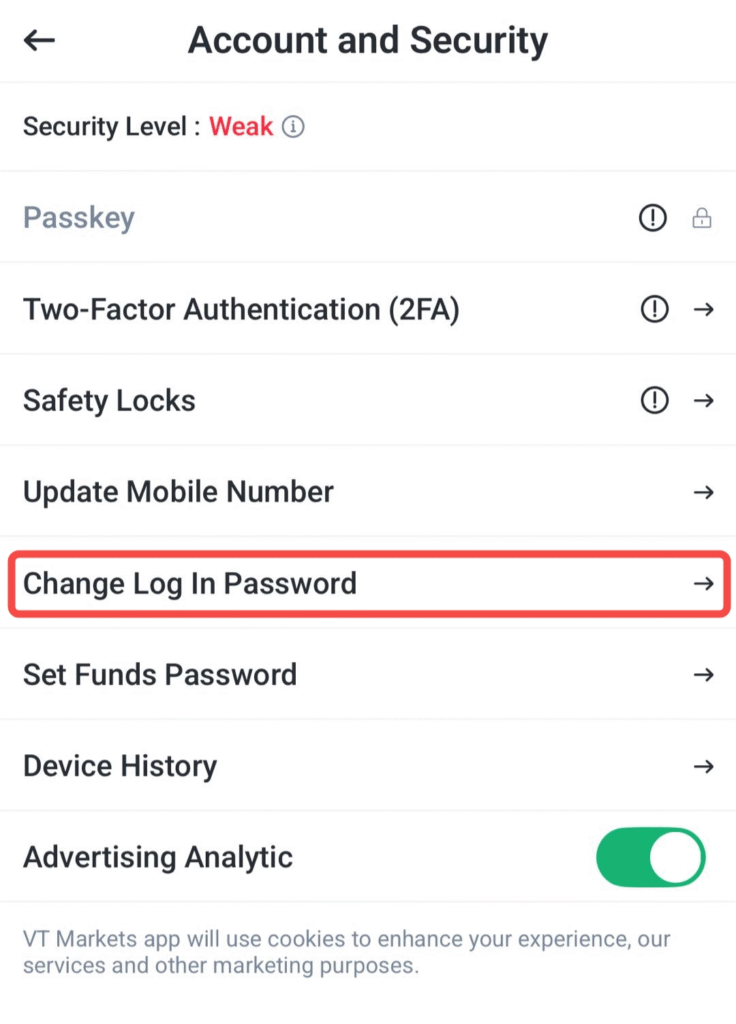
5. Enter the new password and re-type to confirm
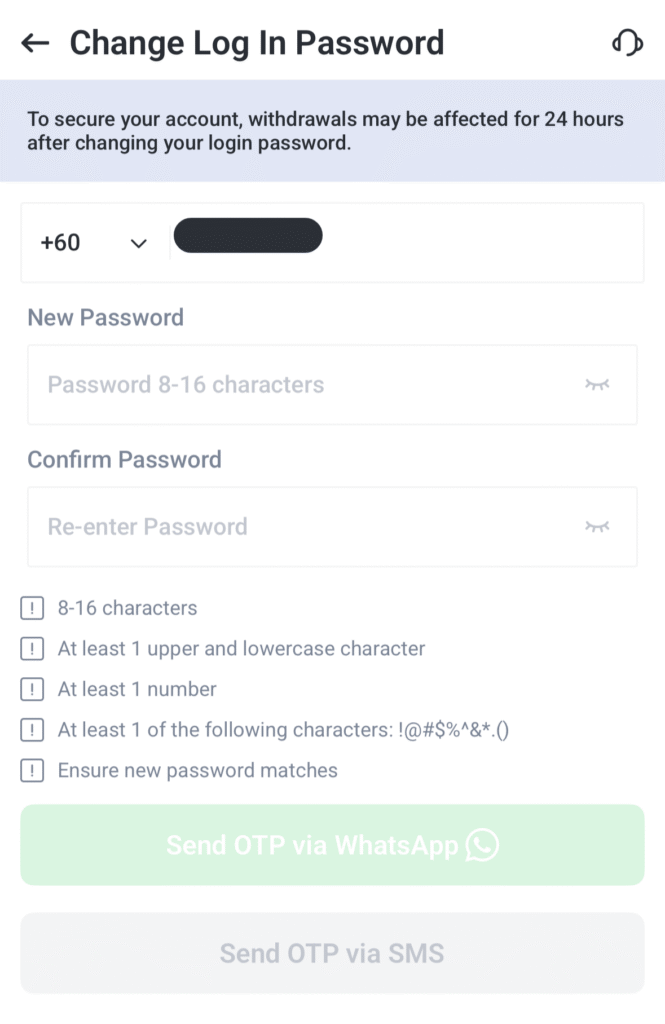
6. Click sent OTP via Whatsapp or SMS
7. Confirm changes
If you have forgotten your password, click Forgot password on the login page and follow the reset instructions sent to your registered email address.
Note: As an added security measure, withdrawals will only become available again 24 hours after the Client Portal password has been successfully changed or reset.
How to Change Your Trading Account Password
Follow these steps:
1. Login to the Client Portal
2. Go to Account
3. Select the trading account you want to manage
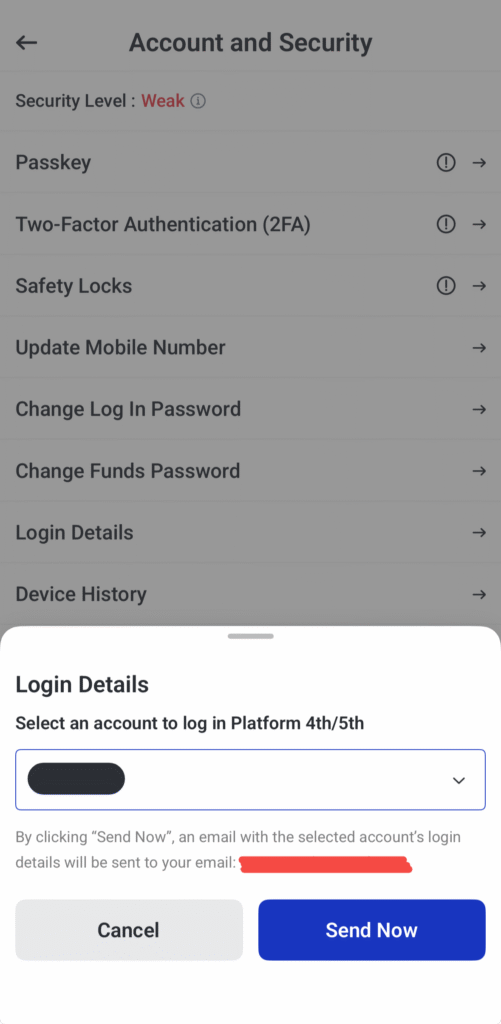
4. Click change funds password
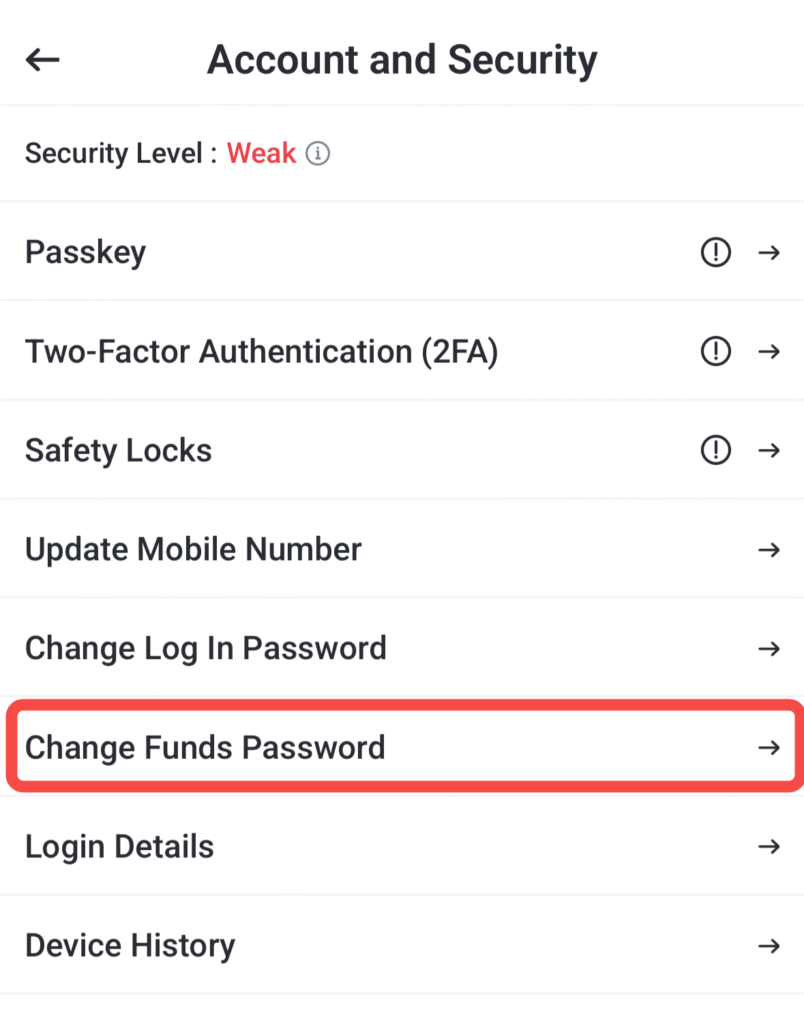
5. Enter your old password, new password and re-type a new password

Note: This only changes the password for that specific trading account. It does not affect your Client Portal login.
VT Markets Security Settings You Should Know
Password security matters, but it is not the only setting worth checking. VT Markets also provides security-related features that help you monitor access to your account more closely.
How to Enable Safety Locks
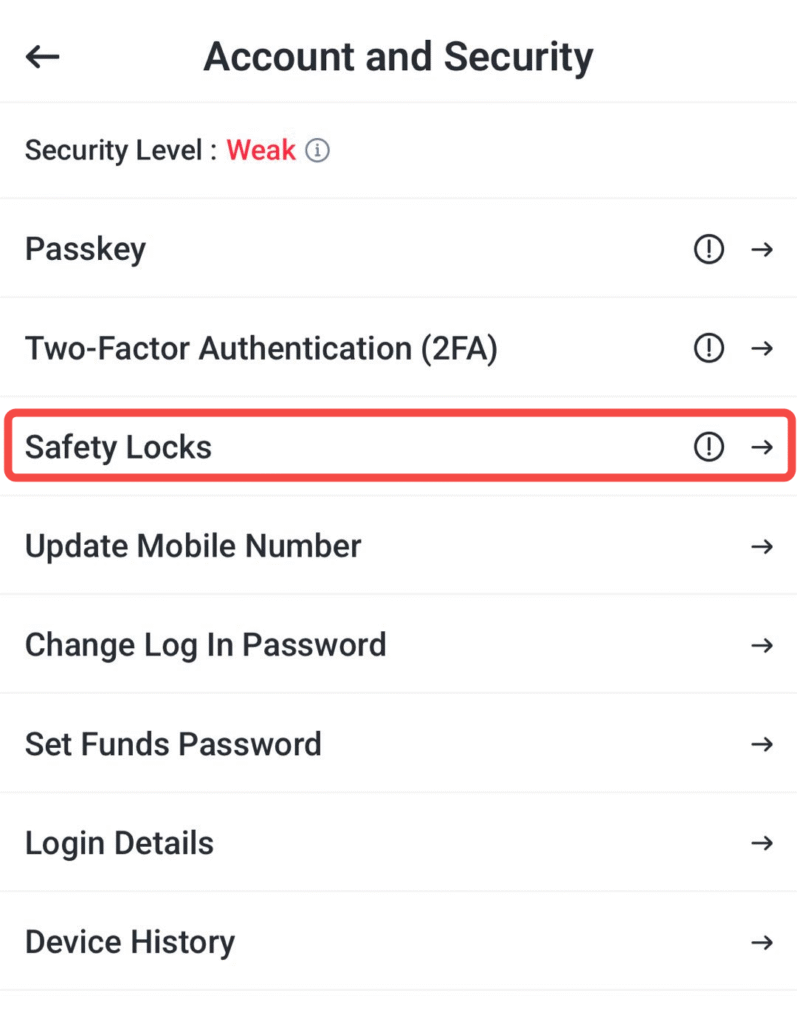
Safety Locks help protect your VT Markets app by requiring Face ID or a pattern code before access is granted, depending on the option you choose. This can add an extra layer of security if your device is left unattended or used by someone else.
To enable this feature:
1. Log in to the Client Portal
2. Go to Profile
3. Select Security → Safety locks
4. Choose your preferred protection setting: face ID unlock, pattern unlock or both
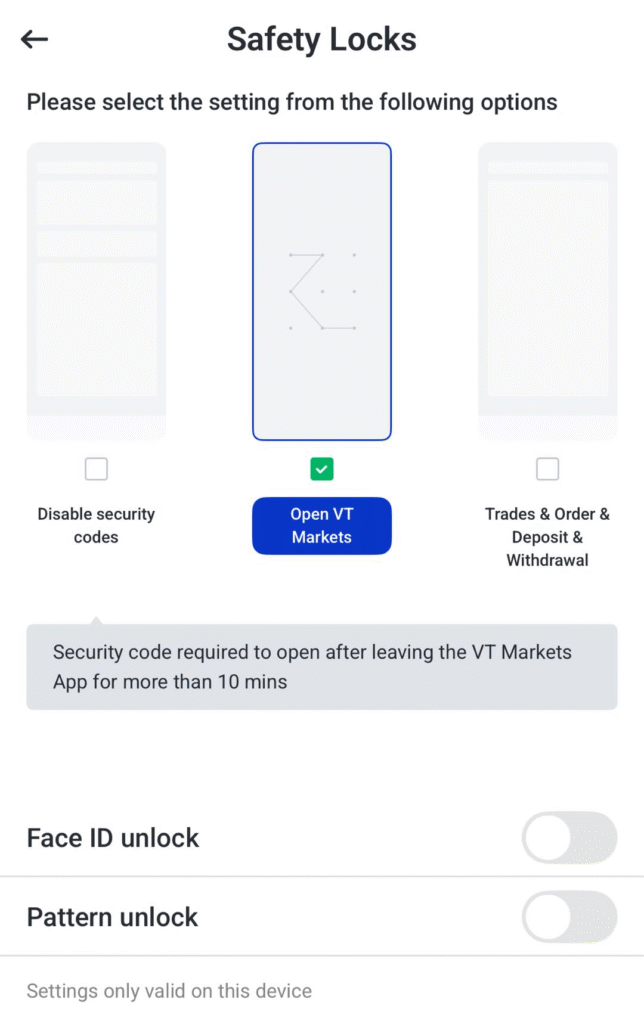
Enabling Safety Locks can be a practical extra layer of protection, especially for clients who want better control over account access on their device.
How to Update Personal Information in VT Markets
Some personal details can be updated, but the process will depend on your account verification status and the type of information being changed. As these details are linked to your identity and security records, certain requests may require supporting documents and internal review.
In most cases, information such as your name, residential address, email address, phone number, and security authenticator settings cannot be changed instantly within the platform. Instead, these updates are typically processed through a verification procedure to help protect account security and ensure your records remain accurate.
Changing Registered Name
The name registered on your VT Markets account is based on the information shown in your Proof of Identity (POI) document, so any update must match your official identification records.
If verification is still pending, minor typographical errors may be corrected during the review process. If your account has already been verified and you later notice an error, you should contact VT Markets through Live Chat or email [email protected] for further review.
For legal name changes, send an email from your registered email address to [email protected] and attach the front and back copies of your updated Proof of Identity document. To help the team identify the request more efficiently, use the New POI Document as the subject line.
Changing Registered Residential Address
Your residential address is based on the details shown in your Proof of Address (POA) document, so any update must be supported by valid address verification.
For accounts where address verification is still in progress, minor typographical errors may be corrected during the review stage. Once verification has been completed, any request to update your residential address should be sent from your registered email address to [email protected], together with your new Proof of Address document.
To help the team process the request more efficiently, use the new POA document for address change as the email subject line.
How to Change Your Email Address, Phone Number, or Reset 2FA
If you need to change your registered email address, update your phone number, or reset your security authenticator, send an email to [email protected] and include:
- Your full name
- The reason for the change or reset
- Your original email address or phone number, where applicable
- Your new email address or phone number, where applicable
- A selfie of yourself holding the front of your ID, with the ID details clearly visible
Once your documents have been verified, the request is usually processed within 1 to 3 business days.
Settings That Cannot Be Changed Directly
Not every account setting can be edited after an account has been created. Some account details are fixed once they have been set, which means clients need to consider alternatives rather than trying to amend the original account.
The main settings that cannot be changed directly are:
- account type
- account currency
- trading account number
What This Means in Practice
If you want a different account type or account currency, the usual solution is to open an additional account through the Client Portal instead of changing the original one.
You can do this through the Client Portal by going to:
1. Account management → New Live Accounts

2. Once the application has been completed, an automated email will be sent with the login details for the additional account.
3. Trading account numbers, however, are system-generated and random, so they cannot be changed under any circumstance.
Read more information in this article:
- How to Open a Live Trading Account with VT Markets
- The Ultimate Guide to the VT Markets Standard STP Account
- The Complete Guide to the VT Markets Raw ECN Account
What to Do if You Cannot Receive Emails From VT Markets
If you are not receiving emails from VT Markets, the issue may be related to your mailbox filters, spam folder, or blocked sender settings.
Before contacting support, try the following:
- Check your junk, spam, or promotions folder
- Make sure [email protected] has not been blocked
- Add [email protected] as a safe sender
- Whitelist email.vtmarkets.com in your email settings if possible
- Make sure you have not unsubscribed from official VT Markets emails
If the missing email still cannot be found after these steps, contact VT Markets online customer service for assistance. In some cases, the support team may help confirm whether the email was sent successfully or whether another account-related issue needs to be checked.
Closing or replacing a VT Markets Trading Account
Trading accounts are typically closed automatically after meeting inactivity and balance conditions outlined below.
If you require manual closure, please contact support.
Automatic Closure Conditions
| Account type | Balance requirement |
| MT4 | Balance must be 10 or less in the account currency |
| MT4 USC | Balance must be 500 USC or less |
| MT5 | Balance must be 0 in the account currency |
| MT5 USC | Balance must be 0 in the account currency |
| Copy trading account | Balance must be 0 in the account currency |
After the balance requirement is met, the account must remain inactive for 90 consecutive days. During that period, there should be:
- no login activity
- no deposits
- no withdrawals
- no internal transfers
- no trading activity
- no copy trading activity
- no event participation
Once all of these conditions are fulfilled, the system will close the account automatically.
Archived Accounts
If your VT Markets trading account has been archived after a long period of inactivity, it cannot be reactivated. Archived accounts are considered closed for use, so clients who want to resume trading will need to log in to the Client Portal with their original registered email address and open an additional live account instead.
It is also important to understand that existing clients cannot create a brand-new registration using the same personal information. If you already have a VT Markets live account on record, the proper next step is not to sign up again, but to open an additional account through the Client Portal. This helps ensure your account records remain consistent while giving you a clear route back into trading.
Frequently Asked Questions
Q1: How Do I Download the VT Markets App?
You can download the VT Markets app from the Apple App Store or Google Play Store by searching for the keywords “VT Markets”. It is also available through the QR code on the official VT Markets website.
Q2: Can I Change My VT Markets Account Type?
No. Direct account type changes are not currently supported. If you would like to use a different account type, you will need to open an additional account through the Client Portal.
Q3: Can I Change My VT Markets Account Currency?
No. Once an account currency has been set, it cannot be changed. To use a different currency, you will need to open an additional account and select your preferred currency during the application process.
Q4: Can I Change My VT Markets Trading Account Number?
No. Trading account numbers are generated randomly by the system and cannot be modified.
Q5: Why Am I Not Receiving Emails From VT Markets?
Start by checking your spam, junk, or promotions folder and searching your mailbox with the keywords VT Markets. You should also make sure that [email protected] is not blocked. Adding the sender as a safe sender and whitelisting email.vtmarkets.com may also help improve email delivery.
Q6: Can I Reactivate an Archived VT Markets Account?
No. Archived accounts cannot be reactivated. To resume trading, log in to the Client Portal using your original registered email address and open an additional live account instead.
Q7: How Long Do Account Update Requests Take?
Requests such as changing your registered email address, updating your phone number, or resetting 2FA are usually processed within 1 to 3 business days after your supporting documents have been reviewed and verified.
Start trading now – Click here to create your real VT Markets account